It is working now, I was able to set it up on a CentOS 8 server:
-
Installed Alfresco version 6.0.2.1: ./alfresco-content-services-community-full-installer-6.0.2.1-ea-linux-x64.bin
-
Configure firewall:
sudo firewall-cmd --permanent --add-port=8080/tcp
sudo firewall-cmd --permanent --add-port=8443/tcp
sudo firewall-cmd --reload -
Check if service is running:
yourIP:8080/share -
Create cmdbuild-model-context.xml and cmdbuildModel.xml into Alfresco server:
vi /opt/alfresco/alfresco-community/tomcat/shared/classes/alfresco/extension/cmdbuild-model-context.xml
vi /opt/alfresco/alfresco-community/tomcat/shared/classes/alfresco/extension/cmdbuildModel.xml
Note: copy the script from the technical manual.
-
Make sure you have an FTP client on CMDBuild server, if not:
sudo yum install ftp -
Reboot Alfresco and cmdbuild servers
-
On cmdbuild aministration module configure DMS
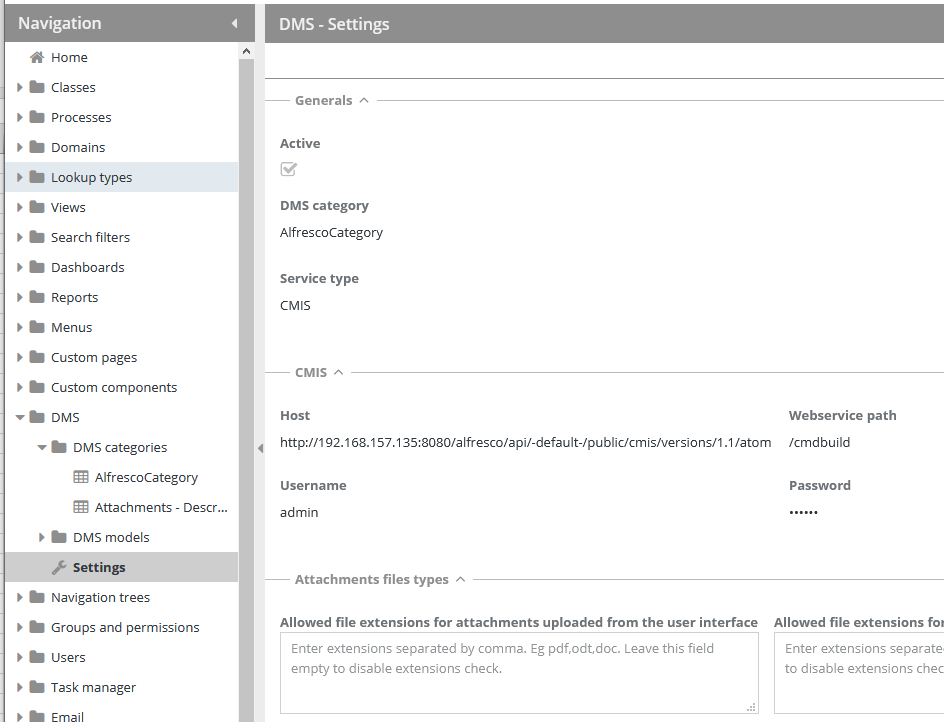
Note: you can use the default in “web service path”, in my case I created a folder on root in Alfresco.
That’s it! hope this is helpful for some one.