Dear All,
When creating from preventive maint planner, First opening date and First expected exec. start date are captured automatically and it is a old date ( year 1969 /1970) So I am unable to create it. I have tried many times by removing all software and reinstalling them.

Hello!
I had the same problem yesterday after the computer crashed.
After thar I cannot save changes in any preventive plan card.
Still working around how to solve it.
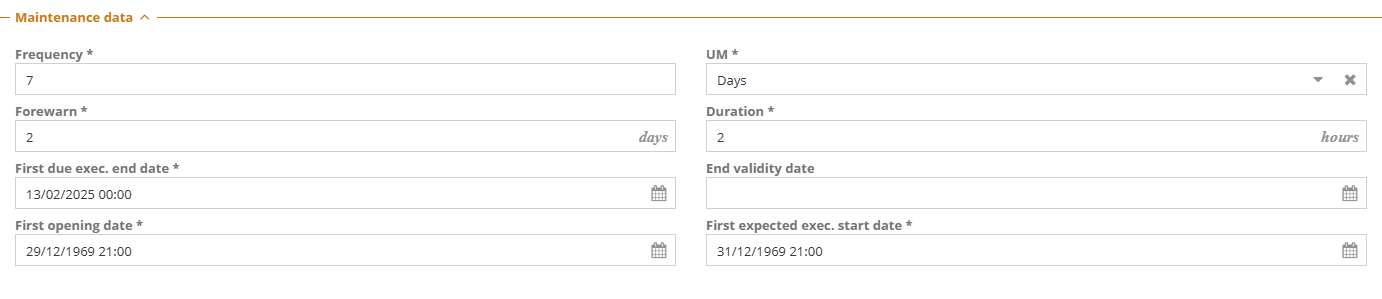
I have the same issue after a computer crash. has any of you been able to repair this issue.
Hello!
Last year it happened after a computer crash and I resintaled all.
Unluckly it happened again, even without an event. Preventive planner stopped working and we detected that the date and the “first opening date” changed to year 1969.
I really would like some help…
Thanks in advance.
Same issue after clean install and intial testing. I spun up the Demo database and it doesn’t have this issue, so something in the database or the demo database install makes it not happen, but a clean empty install is causing it.
I checked the logs on this error and it is complaining the the first openning date and first expected execution start date have a not null constraint that isn’t allowing the row to be added.
I reviewed the opening Date Auto fill javascript (Admin module->classes->Preventative Plan->Attibutes->FirstOpeningDate->Auto Value) and tested putting current date in on fields not completed yet and the current date shows up, so the auto fill function works but the function: utils_prevmaintconfig_info_from_data_get is returning 1969 or null and not allowing the row to be added. I’m going to play with writing my own function to calc the date and putting it in there to resolve the issue… more to come.
So this is weird, I made the First Opening Dat and First expected execution start date edittable, put real relatively close and accurate dates in the fields and cmdbuild.log still gives the error:
StatementCallback; ERROR: null value in column “FirstExpExecDate” of relation “PrevMaintConfig” violates not-null constraint
this issue is really confusing.
So after spending all day debugging, I solved this issue, it turns out that the calcuation for the dates uses the above function to call another function: utils_cal_service_bound_get and that function checks the service status of the building for the site. We are setting up prevenative maintenance on a building that isn’t operative yet so it was not set to Operative and it caused this bug.
Hello! I really appreciate your feedback. It´s a very weird issue indead.
Unfortunatelly all buildings in my system are “operative” in service status. Still working around…
So here are some tips. When the error occurs I found the actual sql command INSERT that failed. I then ran the query on the database and it errored. I then chased the issue into the utils_cal_service_bound_get function and copied it’s code into a stand alone query with the values that cased the error. Turns out there’s debug in that function that told me why it failed. You can either run the query and watch debug printouts or actually create your own query that has the code from the function in it to see what the debug is saying. I must say, the function is a giant for loop which is kind of a no no in sql so I’m not surprised it gives people issues.